
Download Agenty – Customizable AI Team Builder, Secure Web App, Free Beta
Introduction
In an era where artificial intelligence is no longer a luxury for tech giants but a necessity for businesses of every size, the gap between powerful AI capabilities and the expertise required to wield them remains a significant hurdle. Many organizations struggle to translate raw AI potential into practical, day‑to‑day workflows because traditional development pipelines demand data‑science knowledge, expensive infrastructure, and lengthy model‑training cycles. This is where Agenty steps in, positioning itself as a bridge between sophisticated AI models and users who simply need results—fast, secure, and without the overhead of code.
Agenty presents a visual, drag‑and‑drop environment that allows anyone—from a marketer looking to automate sentiment analysis on social media to an operations manager wanting to route invoices through OCR and validation—to assemble a custom “AI team.” The platform is built as a responsive web application, meaning it works on any modern browser, and it offers a growing marketplace of pre‑trained AI workers that can be combined, configured, and extended with minimal friction. By offering a free beta that includes unlimited access to core features, Agenty invites early adopters to experiment, provide feedback, and help shape a product that aims to become the go‑to AI workflow builder for the next decade.
This review will walk you through the essential aspects of Agenty: a detailed product overview, an in‑depth look at its most compelling features, step‑by‑step installation and compatibility guidance, a balanced pros‑and‑cons analysis, frequently asked questions, and a final verdict that explains why you should consider downloading Agenty today. Whether you are a seasoned developer, a business analyst, or a small‑business owner, the insights below will help you decide if Agenty fits your AI automation strategy.
Product Overview & Key Features
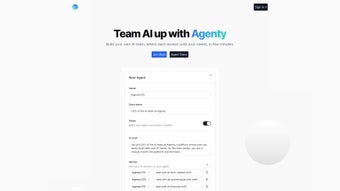
Agenty is a cutting‑edge, web‑based AI platform designed to let users create a fully functional AI workflow without writing a single line of code. At its core is a visual workspace where users can select, configure, and chain together modular AI workers—each representing a specific capability such as text classification, image recognition, data extraction, or workflow automation. The platform’s promise is speed and accessibility: you can design, test, and deploy an AI pipeline within minutes, iterate based on real‑world data, and export the final solution as a secure RESTful API endpoint.
The platform is currently in a public beta, offering free unlimited access to its core library, sandbox testing environment, and collaborative workspace features. Early adopters benefit from regular updates, direct influence on the product roadmap, and a growing marketplace called the Agenty Store, where third‑party developers can publish ready‑made AI workers, connectors, and industry‑specific templates. Security is baked in—data is encrypted both in transit (TLS 1.3) and at rest (AES‑256), and role‑based access controls help organizations meet GDPR, CCPA, and other compliance requirements.
- Modular AI Workers: A library of pre‑trained models (e.g., sentiment analysis, OCR, entity extraction) that can be customized per use case.
- Visual Workflow Designer: Drag‑and‑drop canvas for building conditional logic and data pipelines without code.
- Agenty Store Marketplace: Access third‑party workers, connectors, and templates to extend functionality instantly.
- Real‑time Sandbox Testing: Run sample data through your workflow, view logs, and fine‑tune parameters on the fly.
- Secure Cloud Hosting: Encrypted servers with role‑based access, audit logs, and compliance certifications.
- Versioning & Rollback: Automatic version control for each workflow, allowing safe experimentation.
- API Export: Convert any workflow into a secure RESTful endpoint for integration with apps, mobile devices, or other services.
- Collaborative Workspace: Invite teammates, assign roles, and track changes via built‑in activity logs.
- Free Beta Access: Unlimited workers and storage while the platform remains in beta, with optional paid upgrades for enterprise SLAs.
Performance-wise, each worker runs on scalable cloud instances that automatically allocate compute resources based on workload intensity. Simple text‑processing pipelines consume minimal resources, while intensive image‑or video‑processing chains can spin up GPU‑enabled nodes on demand. The platform also provides basic analytics—including latency, success rate, and error breakdown—to help you monitor and optimize your AI team over time.
Installation, Usage & Compatibility Guide
Because Agenty is delivered as a SaaS web application, there is no traditional installation process for end users. You can start building an AI workflow the moment you create a free account and log in through any modern browser. Below is a comprehensive onboarding guide that walks you through account creation, workspace setup, workflow design, testing, and deployment.
Step‑by‑Step Onboarding
- Create Your Account: Visit agenty.io, click “Sign Up,” and register with an email address or Google OAuth. Verify your email to unlock full beta features.
- Set Up a Workspace: After logging in, click “New Workspace,” give it a descriptive name (e.g., “Customer Support Bot”), and choose privacy settings (private or team‑shared).
- Add AI Workers: Browse the built‑in library or the Agenty Store, select a worker, and configure its input schema, model parameters, and output format.
- Design the Workflow: Drag workers onto the canvas, connect them with arrows, and define triggers (HTTP request, scheduled run, webhook). Use conditional nodes to branch logic based on data values.
- Test in the Sandbox: Upload sample CSV, JSON, or image files, click “Run,” and review live logs. Adjust parameters until the output meets expectations.
- Deploy & Export: Click “Publish” to generate a secure API endpoint. Copy the endpoint URL and authentication token for integration with your existing systems.
System Requirements & Compatibility
As a cloud‑native solution, Agenty works on any operating system that supports a modern web browser, including Windows, macOS, Linux, Chrome OS, iOS, and Android. The platform is fully responsive and functions equally well on desktops, tablets, and smartphones.
For developers who prefer a command‑line interface, Agenty offers a lightweight CLI built on Node.js. Install it via npm and use it to authenticate, push workflow JSON files, and manage deployments:
npm install -g agenty-cli
agenty login
agenty deploy my-workflow.json
The CLI requires Node.js 14+ and runs on Windows, macOS, and Linux distributions. All API calls can be made from any language that supports HTTPS (Python, Java, Ruby, etc.). Because data transmission is encrypted with TLS 1.3, you can safely integrate Agenty into corporate environments without exposing sensitive information.
Browser Compatibility Matrix:
- Google Chrome ≥ 90
- Microsoft Edge ≥ 90
- Mozilla Firefox ≥ 88
- Apple Safari ≥ 14
If you encounter rendering glitches, clearing the browser cache or using an incognito window often resolves the issue. On restricted corporate networks, ensure that outbound HTTPS traffic to *.agenty.io is allowed.
Pros, Cons, Frequently Asked Questions & Final Verdict
Pros
- Intuitive visual builder eliminates the need for code‑level AI expertise.
- Extensive library of pre‑trained AI workers plus a growing marketplace.
- Secure, GDPR‑compliant cloud hosting with role‑based access controls.
- Free beta access with unlimited workers and storage.
- Real‑time sandbox for instant testing and debugging.
- API export enables integration with existing systems and mobile apps.
- Collaborative workspace supports team‑based development.
- Versioning and rollback protect against accidental breaking changes.
- CLI option for developers who prefer scriptable workflows.
Cons
- Documentation is still evolving; some advanced settings lack detailed guides.
- Feature set may change as the beta matures, potentially affecting workflow stability.
- Limited offline capability; constant internet connectivity is required.
- Performance for very large data sets depends on cloud tier, which may incur costs after beta.
- Agenty Store inventory is currently modest; niche models may be unavailable.
- Exported APIs rely on Agenty’s hosting; on‑premise deployment is not yet offered.
FAQ – Your Questions Answered
Is Agenty really free during the beta?
Yes. All registered users receive unlimited access to the core AI worker library, visual designer, and sandbox environment at no cost while the platform remains in beta. Paid plans will be introduced after the public launch for enterprise‑grade features and SLAs.
Can I host Agenty on my own server?
Currently Agenty is offered only as a hosted SaaS solution. The team is exploring on‑premise options for large enterprises, but no timeline has been announced yet.
What types of data can Agenty process?
Agenty supports text, JSON, CSV, images, PDFs, and audio files. Each AI worker defines its own accepted formats, and you can chain converters (e.g., OCR → text extraction) to handle complex inputs.
How secure is my data on Agenty?
All data in transit is encrypted with TLS 1.3, and data at rest is stored using AES‑256 encryption. Role‑based access control and audit logs are built‑in, helping you meet GDPR, CCPA, and other regulatory requirements.
Can I integrate Agenty with external services like Zapier or Slack?
Yes. Agenty provides webhook triggers and can expose RESTful endpoints that Zapier, Slack, Microsoft Teams, and other platforms can call. Custom connectors are also available through the Agenty Store.
Conclusion – Should You Download Agenty?
Agenty arrives at a time when businesses increasingly need AI but lack the resources to build models from scratch. Its visual, modular approach lowers the barrier to entry, letting marketers, product managers, and developers prototype intelligent workflows in minutes. The free beta gives you unrestricted experimentation, while the underlying security architecture ensures that sensitive data remains protected.
The primary trade‑off is the evolving nature of the platform—documentation gaps and feature changes can be a hurdle for mission‑critical projects. However, for anyone exploring AI‑driven automation, the benefits far outweigh these growing‑pains. By joining the beta today, you not only gain immediate access to a powerful toolset but also help shape the future of a platform that could become the industry’s go‑to “AI team builder.”
Ready to build your first AI team? Sign up now, create a workspace, and start experimenting for free. The sooner you dive in, the faster you’ll discover how a customized AI team can accelerate business processes, improve decision‑making, and unlock new revenue streams.



.png)



